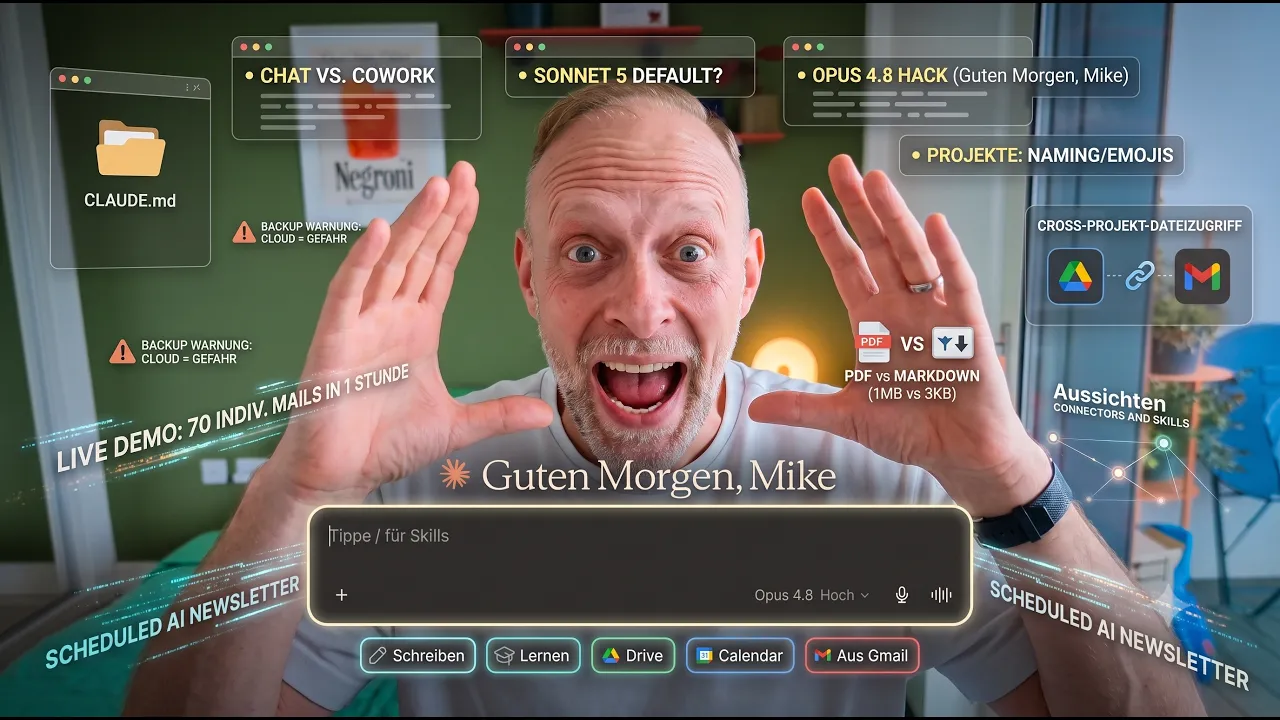
Claude Academy II – Mastering Claude Cowork: Projects, Routines & Why PDFs Consume Your Tokens
A 1 MB PDF versus a 3 KB Markdown file. Both contain the same content. Working with projects, CLAUDE.md, and Markdown files in Claude Cowork uses a fraction of the tokens. It keeps your AI's memory sharp and precise.
Using Claude Cowork as a simple chat window wastes half its potential. Its true strength lies in projects, local memory, and a file setup that allows Claude to work consistently over weeks – without losing context or wasting tokens.
Chat vs. Cowork: the real difference
You know chat from ChatGPT and Gemini. This same chat is available in Claude Desktop. It works well for spontaneous tasks: brainstorming, quick questions, exploration. The core issue: Claude cannot retain anything permanently in a chat. Eventually, the context window fills up, and it becomes forgetful.
Cowork is different. This is where 90% of daily work happens: recurring tasks, projects, weekly reporting, emails, and CRM. Claude gets access to a local folder. It can create, read, and restructure files – and remembers everything important.
Why Cowork works better
Scheduled Tasks. You can set up any task as a routine: daily, weekly, monthly. For example, a morning briefing automatically checks and summarises calendars, emails, ClickUp, and HubSpot every morning.
Parallel execution. Whilst Claude updates your CMS with a new blog post, it can simultaneously draft emails and prepare a newsletter in the background.
Sub-agents. Claude automatically delegates complex tasks. One agent writes, whilst a sub-agent with no prior bias proofreads and provides feedback. This process is faster and delivers better quality than a single, long chat interaction.
Dashboards and Artifacts. Claude can code live dashboards – weekly planners, reports, overviews – that you can share with your team or keep open on a second monitor.
More MCPs. Cowork allows you to integrate MCPs that are not on the official list.
Model choice 2026
Sonnet 5 is the new standard – fast, accurate, affordable. It easily covers 80% of all tasks.
Opus 4.8 is ideal for demanding tasks in unfamiliar territory. Hack: Set Opus 4.8 to 'extra' mode. This is usually sufficient and costs less than Fable 5.
Fable 5 is the most expensive option. Use it sparingly, especially on standard plans.
Folder structure and CLAUDE.md
Keep a central Claude folder in your documents, with subfolders for each project and client. Use emojis in folder names for quick visual separation: Marketing, Client Projects, Flights, Airbnb.
The most critical file in any project is CLAUDE.md. This is where Claude writes down everything it needs to remember permanently. Even if the context window fills up, CLAUDE.md remains. In Cowork, you simply instruct: "Remember to always do it this way from now on." Claude writes it into the file itself.
Backup warning
iCloud, Google Drive, and OneDrive are not suitable storage locations for your Claude folder. These services use two-way syncing. They write back to your hard drive via temporary files that can momentarily be empty. If Claude Cowork accesses the folder at that exact moment, it reads an empty file and overwrites your data. Several such data losses have been documented on Reddit.
Additionally, Macs have a hidden folder called .claude in the home directory (visible with Command-Shift). Make sure to include this in your backup.
Projects: why and how
Cowork allows you to set up projects, keeping all related tasks in one place. Claude knows what you have already discussed. You can define custom instructions for each project, and central project files are automatically available for every task.
Use clear naming rules from the start and add emojis to your folder names. Always rename folders via Claude, never in Finder. Otherwise, Claude loses track of the changes.
PDF vs. Markdown: 1 MB vs. 3 KB
To Claude, PDFs are cryptic: full of code, low on actual signal. For comparison: a CI/CD guide as a PDF is 1 Megabyte. The same document in Markdown is 3 Kilobytes. Same content, 300 times smaller.
The rule: always use Markdown instead of PDF. Convert Word documents to Markdown once, and you will no longer need the original.
Live Demo: 70 individual emails in one hour
Imagine seminar attendee lists in PDF format. The goal: send 70 personalised emails. Claude reads the files via the folder path (Mac: Right-click + Option → Copy pathname), creates a structured Markdown file, and saves it in the project folder. Guided by the seminar minutes, it drafts 70 individual emails in one hour instead of two days.
Cross-project file access
Projects are not isolated. Your morning briefing checks your calendar, emails, ClickUp, and HubSpot daily – and simultaneously accesses the sales pipeline in your Sales folder. If a quote needs a follow-up, it appears in your briefing, even though it lives in a different project.
Scheduled tasks in detail
A scheduled task like the weekly AI newsletter runs automatically every Monday. It starts with a fresh chat, new tokens, and no old context. However, CLAUDE.md is always loaded. Feedback from the current week is recorded in the file and applied next week.
Outlook: Connectors and Skills
The next video explains connectors and skills. If you repeatedly perform the same action across different projects, turn it into a skill. Once created, it is available everywhere and can be distributed to your entire team.